Rev/Occ by Origin
Report Parameters
|
Field |
Description |
|---|---|
|
Report Name |
The name of the report. |
|
Report Date |
The date for which the report must be generated. |
|
Origin |
A drop-down list consisting of all the origin codes. All records created in the Origin (Settings à Setup à Room à Origin) screen are displayed as options in the drop-down list. Users can select multiple or all the origin codes from the list to be displayed in the report generated. |
|
Building Codes |
A drop-down list consisting of all the building codes. All building records created in the Building Codes (Settings à Setup à Room à Building Codes) screen are displayed as options in the drop-down list. Users can select multiple or all the building codes from the list to be displayed in the report generated. |
|
Room Type |
A drop-down list consisting of all the room types. All room types created in the Room Type Maintenance (Settings à Setup à Room à Room Type Maintenance) screen are displayed as options in the drop-down list. Users can select multiple or all the room types from the list to be displayed in the report generated. |
|
Include Non-Bedded Rooms |
When enabled, the room types with non-bedded rooms are included in the report. |
|
Separate By Building Code |
When enabled, the records in the generated report are sorted by building type. |
|
Revenue Options |
Available options include the following:
By default, the Sold Rate option will appear selected. |
Sample Report
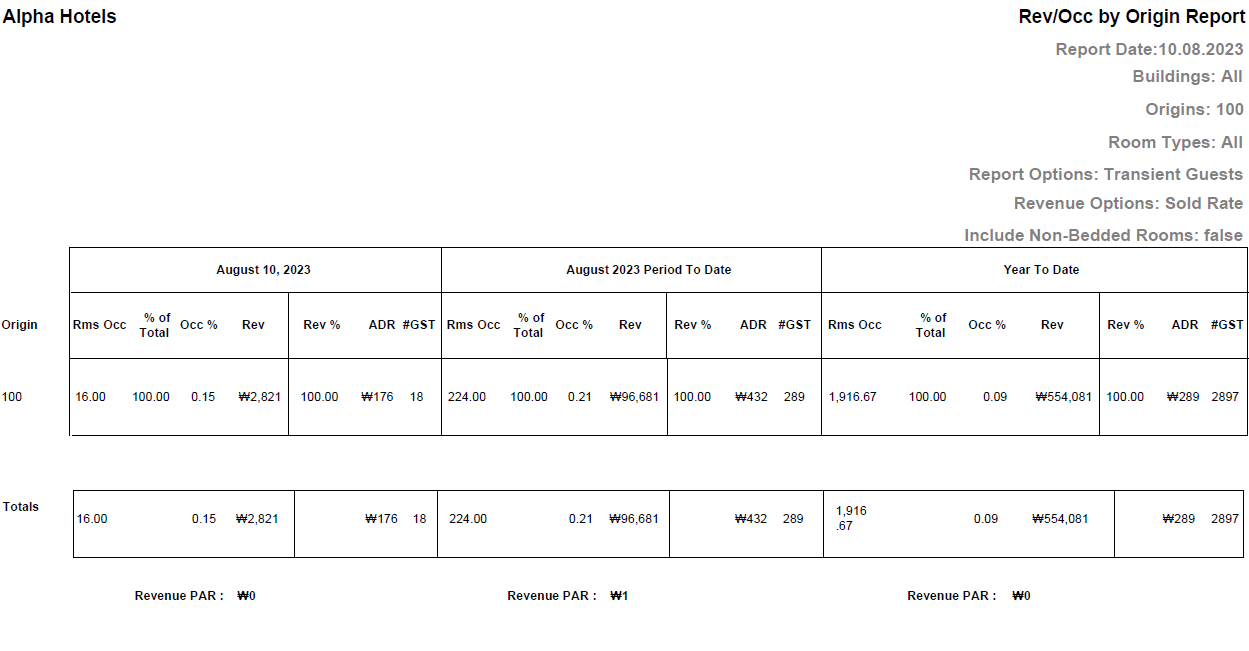
Report Fields
|
Field |
Description |
|---|---|
|
Origin |
Displays the origin code. |
|
Date |
|
|
Rms Occ |
The number of rooms occupied by guests from the selected origin. |
|
% of Total |
The percentage of the total number of occupied rooms for each selected origin. |
|
Occ % |
The occupancy percentage. The value is calculated as follows: (Total Number of Occupied Rooms / Total Number of Rooms) × 100 |
|
Rev |
The sum of all revenue earned through room assignment for the selected date. |
|
Rev % |
The revenue percentage. The value is calculated as follows: (Total revenue of the code/Total revenue for the period) x 100. |
|
ADR |
The average daily rate calculated by the system. |
|
#GST |
The total number of guests stayed in property for a guest type. |
|
Totals |
The total is displayed in each of the available columns in the report. |
|
Revenue PAR |
The revenue PAR available room is calculated as follows: Revenue PAR = Total Room Revenue divided by total number of rooms. |
|
Period to Date |
|
|
Rms Occ |
The number of room nights reserved from period to date. |
|
% of Total |
Percentage of total occupied rooms. |
|
Occ % |
The occupancy percentage is calculated as follows: (Total Number of Occupied Rooms / Total Number of Rooms) × 100. |
|
Rev |
The sum of room revenue amounts earned per market segment from period to date. |
|
Rev % |
The revenue percentage is calculated as follows: (Total revenue of the code/Total revenue for the period) x 100. |
|
ADR |
The system calculated average daily rate. |
|
#GST |
The total number of guests stayed in the property. |
|
Totals |
The total count for each of Rms Occ, Occ %, Rev, ADR, GST columns is displayed. |
|
Revenue PAR |
The revenue PAR available room is calculated as follows: Revenue PAR = Total Room Revenue divided by total number of rooms. |
|
Year to Date |
|
|
Rms Occ |
The number of room nights reserved from year to date. |
|
% of Total |
Percentage of total occupied rooms. |
|
Occ % |
The occupancy percentage is calculated as follows: (Total Number of Occupied Rooms / Total Number of Rooms) × 100. |
|
Rev |
The sum of room revenue amounts earned per market segment from year to date. |
|
Rev % |
The revenue percentage is calculated as follows: (Total revenue of the code/Total revenue for the period) x 100. |
|
ADR |
The system calculated average daily rate. |
|
#GST |
The total number of guests stayed in the property. |
|
Totals |
The total count for each of Rms Occ, Occ %, Rev, ADR, GST columns is displayed. |
|
Revenue PAR |
The revenue PAR available room is calculated as follows: Revenue PAR = Total Room Revenue divided by total number of rooms. |